


BitBible ENG -Lockscreen+Alarm
4.0614.00 Reviews
App Specs
- Version
- 1.7.24
- Updated On
- License
- Free
- Downloads
- 500,000+
- Developer
- BitBible
- Categories
- Books & Reference
- Platform
- Android
Screenshots

 Analysis by AppCompare
During my first few days with BitBible ENG - Lockscreen+Alarm, the appeal was easy to understand: the app puts short Bible reading into moments I already spend looking at my phone. A verse on the lockscreen can turn an ordinary unlock into a brief pause, while the alarm gives the morning routine a faith-centered cue. That simplicity is its strongest opening move, though whether it earns a permanent place depends on how well those small encounters fit your habits.
The first-week appeal: a small prompt in familiar places
I can see this working especially well for someone who wants a lightweight nudge rather than a full study program. Imagine checking your phone while waiting for the kettle, then seeing a verse before opening messages. It takes almost no planning, and that matters when a new routine is competing with a busy morning. The app’s Books & Reference focus is clear, but its approach is less like sitting down with a book and more like placing a reminder along a path you already follow.
That convenience also changes what I expect from it. A lockscreen verse is a prompt, not necessarily a complete reading session: if a passage catches your attention, you may want to stop and read more rather than treat the glance as the whole experience. I’d use it as an invitation to reflect, not as a substitute for a Bible, a study guide, or a conversation with someone whose interpretation I trust.
Who gets the most from the format
The app is a natural fit for readers who prefer frequent, brief reminders and already unlock their phones throughout the day. It may also suit someone trying to reconnect with Scripture without committing to a lengthy daily plan. For a beginner, seeing a short passage in an everyday context can feel less demanding than opening a large reference app and deciding where to start.
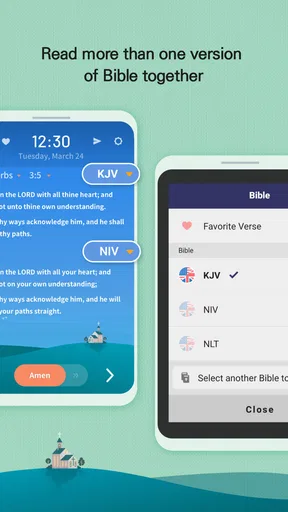
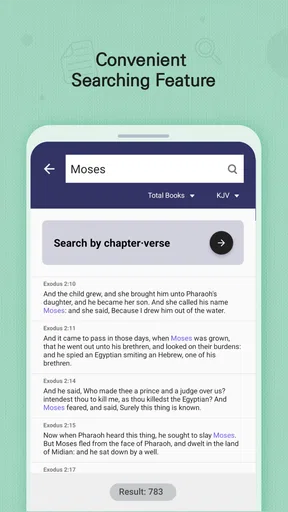
On the other hand, I would not choose this as my main tool if I wanted detailed notes, commentary, parallel translations, or a structured reading schedule. Those needs call for a dedicated Bible or study app. The difference is practical: BitBible’s stated appeal is quick access to reading, while a conventional Bible app is usually the better place to search, compare, and work through longer passages. I’d keep both only if each had a distinct job, rather than expecting one to cover everything.
A routine that survives a busy morning
A realistic use case is setting the alarm before bed, then taking a moment with the verse after waking instead of immediately switching to social feeds. If the morning is rushed, the lockscreen can still offer a short pause later while you wait for a ride or stand in line. This is a useful distinction: the alarm can anchor a planned moment, while the lockscreen can make reflection possible when the original plan slips.
For a steadier habit, I’d connect the prompt to something I already do, such as reading it while the kettle heats or after turning off the alarm. I would avoid setting an ambitious target around every notification or unlock; that can make a gentle reminder feel like homework. The app’s value is more likely to last when it supports a small, repeatable practice instead of demanding a dramatic change to the day.
Worth Reading Before You Choose

EA SPORTS FC Mobile 26 Is a Bigger Football Game, but It Takes Time

Flipboard Shows What News Apps Must Do Beyond the Feed

Switching to Android Auto Means Rethinking Your Driving Routine

Google Calendar Makes a Crowded Week Easier to Manage

Ludo King Makes the Most of the Minutes Between Plans

Baby Panda World Brings Quick Play to Modern Phones, but Its Game Library Feels Busy
A Blend of Faith and Functionality
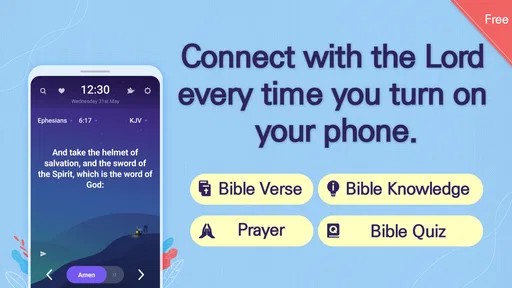
First off, what really caught my eye about the BitBible ENG - Lockscreen+Alarm is how it combines spiritual content with practical features. You know how sometimes you need a little push to get out of bed, or perhaps a moment of reflection to start your day? This app tackles both! It’s like having a personal assistant that not only wakes you up but also feeds your soul.
Lockscreen with a Purpose
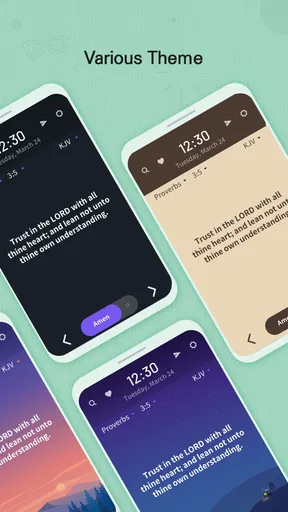
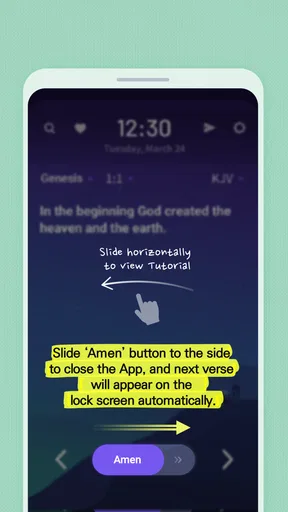
Let’s talk about the lockscreen feature. Every time you unlock your phone, you’re greeted with a meaningful Bible verse. It’s a refreshing change from the usual home screen monotony. It’s like a mini-meditation moment that you didn’t even know you needed. Whether you’re waiting for the bus or just taking a quick break, these verses offer a gentle reminder of what truly matters.
That placement is both the clever part and the main trade-off. A verse appearing in a familiar spot lowers the effort needed to read, but it can also become background if I unlock the phone automatically and move on without taking it in. I’d try leaving the phone untouched for a few seconds after the screen appears, or reading the verse once before tapping into another app. That tiny pause is more useful than simply collecting glimpses without reflection.
It’s also worth thinking about when and where the screen is visible. If you regularly check your phone in meetings, shared spaces, or around people who may not expect religious content, a prominent verse could feel less private than opening a reading app intentionally. The feature is best when the lockscreen itself is a comfortable place for that reminder; readers who prefer to choose their reading moment may be happier with a standard Bible app they open on demand.
Alarm with a Twist
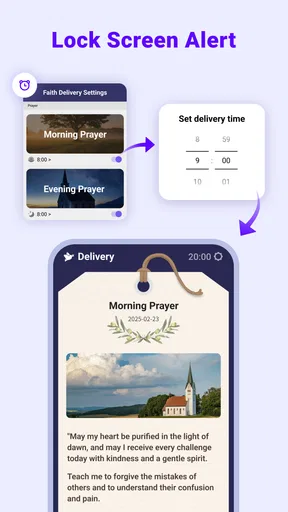
Now onto the alarm feature. You might be thinking, “An alarm is an alarm, right?” Well, not quite. This one allows you to wake up to an inspiring verse rather than the usual blaring tones. It’s a nice touch that makes waking up a bit less painful. Plus, you can customize the alarm to fit your schedule, so there’s no excuse for hitting the snooze button one too many times.
I’d treat the inspirational element as a tone-setter, not as a guarantee that waking up will suddenly become easy. The best test is whether the alarm fits your actual schedule and whether its style feels welcome when you are half-asleep. If you rely on a separate alarm routine already, I would avoid changing everything at once: try the Bible-centered prompt alongside your existing morning habits, then decide whether it genuinely helps you get moving.
Sleek and User-Friendly Interface
The app’s interface is super user-friendly, which is always a plus. You don’t need to be a tech wizard to navigate through it. Everything is laid out intuitively, from setting up your lockscreen preferences to scheduling your alarms. It’s clear that a lot of thought has gone into making sure the app is accessible to everyone.
Simple navigation matters here because the app is meant to become part of a routine, not another project to manage. I’d spend a little time setting the experience up when I’m not rushing, then leave the everyday interaction as uncomplicated as possible. The more often I have to stop and adjust settings, the less likely I am to keep using a habit prompt consistently.
“In a world full of chaos, sometimes all you need is a small moment of peace.”
A Handy Tool for Daily Reflection
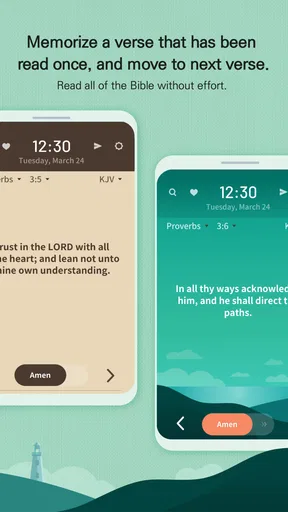
For those who are keen on incorporating more spirituality into their daily routine, this app serves as a handy tool. The verses are carefully selected to cover a wide range of themes, from love and forgiveness to strength and perseverance. It’s like having a pocket-sized devotional that’s always with you.
One helpful way to use brief readings is to let a line raise a question for later: what does this passage mean in context, or how might it relate to something I’m facing today? I would make a note elsewhere if a verse prompts a deeper study, rather than assuming that seeing a passage once provides all the context needed. That approach lets the app serve as a starting point while leaving room for fuller reading when time allows.
Customizable Experience
One of the things I appreciate most is the ability to customize the experience. You can choose the themes that resonate with you and even select which books of the Bible you’d like the verses to come from. This level of personalization ensures that the app feels tailor-made for your spiritual journey.
Those choices can help keep the daily prompts relevant, but I’d use them thoughtfully. If I narrow the selection too much to familiar passages or favorite themes, the experience may feel comfortable while offering less variety. A practical middle ground is to choose what supports the habit now, then revisit those preferences when the prompts start feeling predictable. Personalization works best as a way to shape the reading, not to turn it into a filter that only confirms what I already expect.
What may wear thin, and what upkeep it asks of you
The main source of fatigue is repetition of the routine itself: a screen that appears many times can become easy to dismiss, even when the words are meaningful. The alarm can also lose its novelty once it becomes part of an ordinary morning. I wouldn’t interpret that as a failure of the app; it is a reminder that a prompt can support a habit but cannot supply attention or motivation every day.
Maintenance should be modest if you keep your setup simple: make sure the alarm reflects your current schedule, and adjust your chosen themes or books when the experience no longer feels relevant. I’d also check that the app is behaving as expected after changing phone settings or routines, rather than assuming an alarm will always fit a new schedule without a quick review. For readers who dislike lockscreen changes or want complete control over when religious content appears, the recurring presence may be more friction than benefit.
How it compares with familiar alternatives
Compared with opening a Bible app deliberately, BitBible’s advantage is immediacy: the reading prompt can meet you at the lockscreen or morning alarm, reducing the number of steps between intention and a brief encounter with Scripture. A dedicated Bible app is usually more suitable when I want to search a passage, read a longer section, or explore study material. A paper Bible, meanwhile, avoids phone distractions and may be a better choice for focused reading away from notifications.
I’d choose based on the gap I’m trying to fill. If I already read regularly but need a quick reminder during the day, this format has a clear role. If I’m looking for a comprehensive study library, a reliable way to compare texts, or a phone-free devotional practice, I’d reach for a different option and use BitBible only if its lockscreen prompt adds something distinct.
Availability and everyday fit
BitBible is a free app from developer BitBible, and it is rated for Everyone. It has an average rating of 4.0 from around 2.4 thousand ratings, with over 500 thousand installs. Those figures suggest it has found a sizeable audience, but I’d still judge it by whether the lockscreen and alarm suit my own phone habits rather than treating popularity as a guarantee of fit.
It was released on August 25, 2022, and the current version is 1.7.24, with Android 7.0 as the minimum operating system. If you’re deciding whether to install it, the useful question is whether you want Scripture to appear as a recurring, passive prompt or prefer to open a reading tool only when you choose. The first approach is convenient; the second gives you more control over timing and attention.
Final Thoughts
All in all, the BitBible ENG -Lockscreen+Alarm app is a delightful blend of technology and spirituality. It seamlessly integrates into your daily life, offering moments of reflection and inspiration at every turn. Whether you’re a morning person or a night owl, this app has something to offer. If you’re looking to elevate your daily routine with a touch of faith, give this app a try.
So, are you ready to start your day with a dose of inspiration? Check out the download link below and see for yourself how this app can make a difference.
Does it earn a lasting place?
For me, the long-term case is strongest when the app fills a narrow, useful role: a brief Scripture prompt at moments already built into the day. I’d keep it if the lockscreen still encourages an occasional pause after the first-week novelty fades, and if the alarm remains a welcome part of my morning rather than another sound I automatically dismiss. If those moments become invisible, there is no need to force the habit; a scheduled reading or a book on the bedside table may work better.
My recommendation is therefore specific rather than universal. Try it if you want an easy, low-effort way to bring Bible reading into everyday phone use and appreciate a morning cue with a spiritual focus. Skip it if you need a full-featured study environment, dislike seeing prompts on your lockscreen, or already have a routine that works and don’t want another recurring reminder. Its lasting value comes not from doing everything, but from making one small practice easier to return to.
Pros
- User-friendly interface for easy navigation.
- Customizable lockscreen with widgets.
- Efficient alarm system with multiple options.
- Offline access to Bible passages.
- Regular updates with new features.
Cons
- Limited translation options available.
- Ads can be intrusive at times.
- Some features require in-app purchases.
- Occasional bugs in alarm settings.
- No support for audio Bible features.
FAQs for BitBible ENG -Lockscreen+Alarm
What features does BitBible ENG - Lockscreen+Alarm offer?
BitBible ENG - Lockscreen+Alarm combines a digital Bible with unique features like a customizable lockscreen and an integrated alarm system. Users can access daily Bible verses directly from their lockscreen, set reminders, and personalize their experience with various themes and fonts. This app aims to provide spiritual growth tools right at your fingertips.
Is BitBible ENG - Lockscreen+Alarm easy to use for beginners?
Yes, BitBible ENG - Lockscreen+Alarm is designed with user-friendliness in mind. It has an intuitive interface that guides users through its features effortlessly. Whether you're tech-savvy or a beginner, you'll find navigating through the Bible, setting alarms, and customizing your lockscreen straightforward and simple.
Can I customize the lockscreen and alarm features in BitBible ENG?
Absolutely! BitBible ENG allows extensive customization options. Users can choose from various themes, fonts, and colors to personalize their lockscreen. The alarm feature is flexible, letting users set multiple alarms with different tones and messages, making sure you start your day with your chosen scripture or reminder.
Does BitBible ENG - Lockscreen+Alarm require an internet connection?
While BitBible ENG - Lockscreen+Alarm offers offline access to Bible texts, certain features like daily verse updates and theme downloads may require an internet connection. However, the core functionalities, like reading the Bible and using the alarm, are available offline, ensuring uninterrupted access.
Is there any cost associated with downloading or using BitBible ENG - Lockscreen+Alarm?
BitBible ENG - Lockscreen+Alarm is free to download, with many features available at no cost. However, there might be in-app purchases for premium themes or additional content. These optional purchases enhance the experience but are not necessary to enjoy the app's primary features.


